
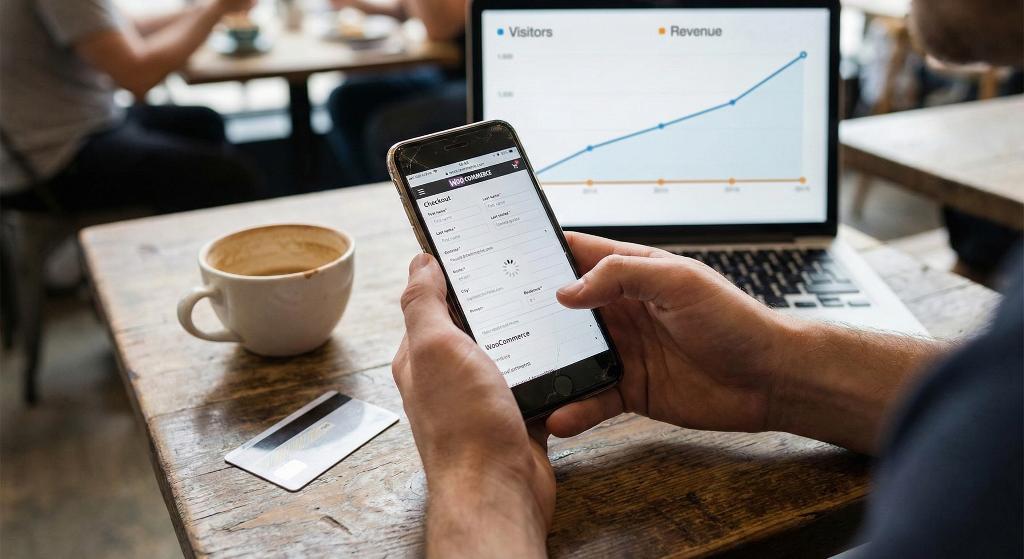
The numbers look okay, but your bank account doesn't.
You check your stats. People are visiting your site.
Product pages get views. Some folks even add things to their cart.
And still — sales crawl.
If you run a WooCommerce store, this is painfully common. Most store owners assume they need more visitors, better prices, or to somehow outdo everyone else.
Sometimes that’s true.
But more often than not, the real issue is what happens when people try to pay.
That’s what this post is about. Not traffic.
Not ads.
Just the part where money is supposed to change hands — and often doesn’t.
Counting Visitors Is Easy. Getting People to Trust You Isn't.
Traffic only tells you that someone showed up.
Sales mean they felt comfortable enough to buy.
What sits in the middle is the payment step — and it’s also the most fragile part of the whole flow.
This is where people hesitate.
This is where they second-guess themselves.
This is where they leave.
Not because they suddenly hate your product.
Because paying turned into work.
More visitors won’t fix that.
At least, not by itself.
A smoother way to pay, though?
That’s usually where things start to change.
The WooCommerce Problem
WooCommerce is solid. It’s flexible, powerful, and widely used.
But the default payment experience isn’t great.
Not terrible. Just… not great.
Over time, stores pile on:
- extra add-ons
- weird fields nobody really needs
- checks that feel unnecessary
- design elements that don’t belong here
Each one feels small.
Together, they become a problem.
So you end up here:
- people want your product
- they reach the payment step
- then something breaks the moment
That’s where revenue quietly leaks out.
Is Your WooCommerce Payment Area Messed Up? Look for These Signs
If people visit your store but don’t buy, you’ll usually notice a few familiar patterns:
- lots of abandoned carts
- shoppers bouncing back to the cart again and again
- payments that never finish
- customers asking basic “how do I pay?” questions
- way fewer purchases on phones than on desktops
None of this is random.
This is what confusion looks like when it shows up in analytics.
When paying isn’t clear, people pause.
When they pause, they leave.
Why How People Pay Stops Sales
The payment step is peak intent.
By the time someone gets there, they’ve already:
- picked the product
- accepted the price
- decided they want it
So even small problems matter here. A lot.
A slow page.
Too many boxes.
A button that feels off.
Any of that is enough for someone to think, “I’ll finish this later.”
They usually don’t.
Common WooCommerce Payment Problems
Too Many Boxes to Fill Out
WooCommerce tries to work for every kind of store imaginable.
Most stores don’t need that level of detail.
Asking for company names, second addresses, or long billing info — especially for digital products — just gives people more reasons to quit.
Every field asks a question.
Every question adds friction.
Making People Create an Account
Forcing account creation before payment is still one of the fastest ways to lose a sale.
Signing up feels like effort.
Paying should feel like relief.
Too Many Steps for No Real Reason
Breaking payment into steps can work — when each step actually helps.
In a lot of WooCommerce setups, it doesn’t.
It just adds clicks.
More steps don’t feel safer.
They just feel longer.
Stuff That Pulls Attention Away
Menus, promos, footer links — none of that needs to be visible when someone is paying.
At this point, there should be one job: finishing the purchase.
Everything else is noise.
A Rough Phone Experience
Most people visit WooCommerce stores on their phones.
Payment flows often still feel desktop-first.
Small inputs. Tight spacing. Confusing buttons.
On a slow connection or a small screen, that’s all it takes to lose someone.
Why More Traffic Doesn't Always Help
When sales slow down, the instinct is obvious: get more traffic.
- ads
- SEO
- social posts
The problem is that traffic multiplies whatever system you already have.
If payment is clunky, more visitors just means more abandoned carts.
Fixing payment first makes every visitor more valuable — now and later.
How to Fix Your WooCommerce Payment Process
This isn’t about tricks or clever hacks.
It’s about removing the things that make buying harder than it needs to be.
The fixes that work best are usually simple.
Sometimes boring.
That’s kind of the point.
Don’t Ask for Too Much
Only ask for what you actually need to complete the order.
Less typing means fewer drop-offs.
Fewer drop-offs mean more sales.
Simple math.
Make the Flow Obvious
Whether it’s one page or multiple steps, people should always know where they are.
They shouldn’t be wondering:
- what comes next
- how long this will take
- whether something went wrong
Clear beats clever every time.
Make the Payment Button Hard to Miss
The payment button should:
- stand out
- use plain language
- sit exactly where people expect it
Checkout is not the place to get creative with copy.
Remove Distractions
At payment, everything except paying is a distraction.
Remove:
- menus
- unnecessary links
- banners
- side actions
Focus finishes purchases.
Design for Phones First
Mobile payment shouldn’t feel like a shrunken desktop form.
That means:
- large tap targets
- comfortable spacing
- fast load times
- minimal scrolling
If payment works well on phones, it usually works everywhere.
What Changes When Payment Gets Easier
What surprises most store owners is what doesn’t need to change.
You don’t need:
- more products
- lower prices
- more traffic
- constant discounts
You keep everything else the same — and just remove friction.
Then things start to shift:
- fewer abandoned carts
- smoother payments
- more completed orders
- fewer support questions
Buying stops feeling like a chore.
Picking the Right Tools
Not every add-on improves payment. Some make it worse.
Before installing anything, it helps to be clear about what actually matters:
- works cleanly with WooCommerce
- no custom code required
- lightweight and fast
- mobile-friendly
- focused only on payment
The goal isn’t to add more stuff.
It’s to get out of the customer’s way.
Why Fixing Payment Pays Off
Payment improvements compound.
When it’s easier to buy:
- ads become more profitable
- search traffic converts better
- email campaigns work harder
- repeat purchases increase
Everything upstream benefits.
That’s why fixing payment is often the highest-impact change a WooCommerce store can make.
Last Thoughts
If your WooCommerce store gets visitors but stays broke, traffic probably isn’t the real problem.
Most of the time, the biggest opportunity sits at the very end — where interest is supposed to turn into revenue.
Payment is where sales happen.
Or where they quietly disappear.
Fix that, and the rest of the store starts pulling its weight.